What kinds of visual materials can you add to your research paper?
- Drawings, paintings, photographs and other works of art
- Graphs, tables and other data charts
- Maps
- Flow charts and other illustrations
- Any visual medium that provides useful information for your reader
When should you include visual material?
- They are supporting or enhancing your text, not replacing it.
- They are appropriate for the assignment (see what to avoid).
- They are directly related to your topic.
- You have referred specifically to the material in your writing.
What should you avoid when including visual material?
- Humorous or potentially offensive material that is not appropriate for academic writing
- Presenting a graphic before you have mentioned it in your text
- Placing a visual in an awkward spot where it breaks up a paragraph or leaves a bunch of white space on the page.
- Using Google Images without visiting the original source of the material. You need to do this to get the information needed to cite the visual properly and to confirm that the image is truly what you think it is.
- Overusing visual material.
How do you format a visual that you are adding to your essay?
- Choose a clear, high-quality image that is large enough for details to be easily seen without taking up too much space on the page.
- Place your graphic BETWEEN PARAGRAPHS (not within them) and AS CLOSELY AS POSSIBLE to the paragraph where it is mentioned for the first time.
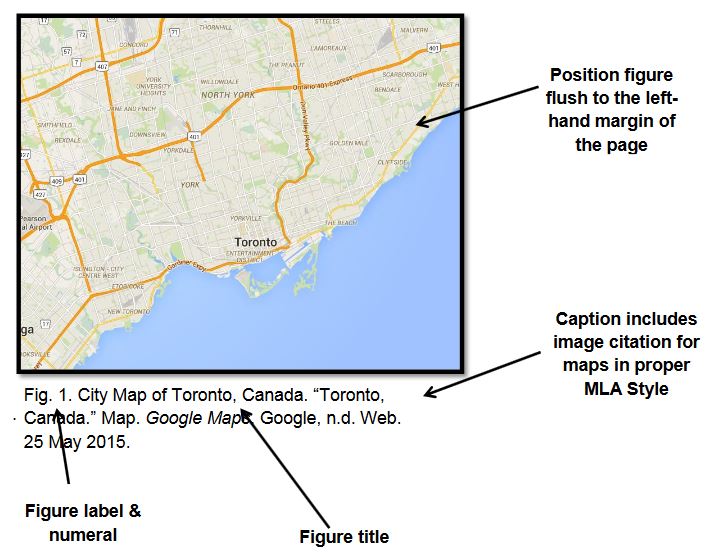
- Give each graphic a figure number (abbreviated Fig. 1, Fig. 2, etc.). Your visuals should appear in numerical order based on their figure number.
- Follow the figure number with a short, descriptive title that explains its content.
- Include the bibliographic reference after the title (use the same format that you would use if you were adding a source to your list of Works Cited). You do not need to include your visual materials in your Works Cited because you have already included this information in your captions.
- REMEMBER: Google Images should not be given as the source for any of your images. Click on the image to go to the original source of the image.
- Colour images are only necessary when the colours are needed for clarity.
- Centre or left-align the image based on what looks best. Whatever alignment you choose, use it consistently for all visuals.
- You do not need to use bold or italics for the figure number or title.
- You do not need hanging indentations.